---
title: Menu
urlSegment: typography
sidebar:
order: 5750
slug: "it/atime/typography"
lastUpdated: 2026-09-15T11:52:45.000Z
---
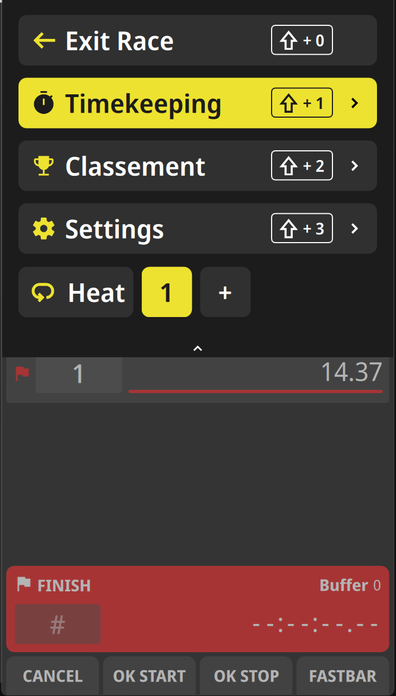
Nel menu puoi effettuare tutte le regolazioni per il cronometraggio.
## Come accedere
### Tastiera
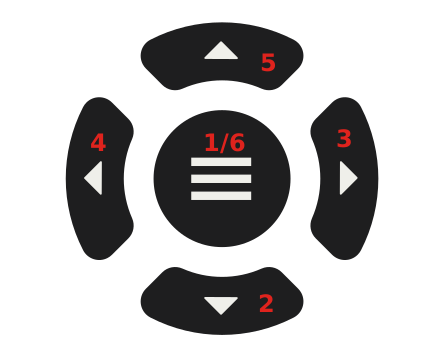 1. Premere il tasto centrale per entrare nel menu
2. Premere il tasto inferiore per scorrere verso il basso nel menu mostrato
3. Premere il tasto destro per scendere al livello successivo del menu
4. Premere il tasto sinistro per tornare al livello precedente del menu
5. Premere il tasto superiore per scorrere verso l'alto nel menu mostrato
6. Premere il tasto centrale per uscire dal menu
### Touchscreen
scorri con un dito dalla parte superiore dello schermo verso il basso
1. Premere il tasto centrale per entrare nel menu
2. Premere il tasto inferiore per scorrere verso il basso nel menu mostrato
3. Premere il tasto destro per scendere al livello successivo del menu
4. Premere il tasto sinistro per tornare al livello precedente del menu
5. Premere il tasto superiore per scorrere verso l'alto nel menu mostrato
6. Premere il tasto centrale per uscire dal menu
### Touchscreen
scorri con un dito dalla parte superiore dello schermo verso il basso